Best Smart Home Devices for Beginners (2025 Guide)
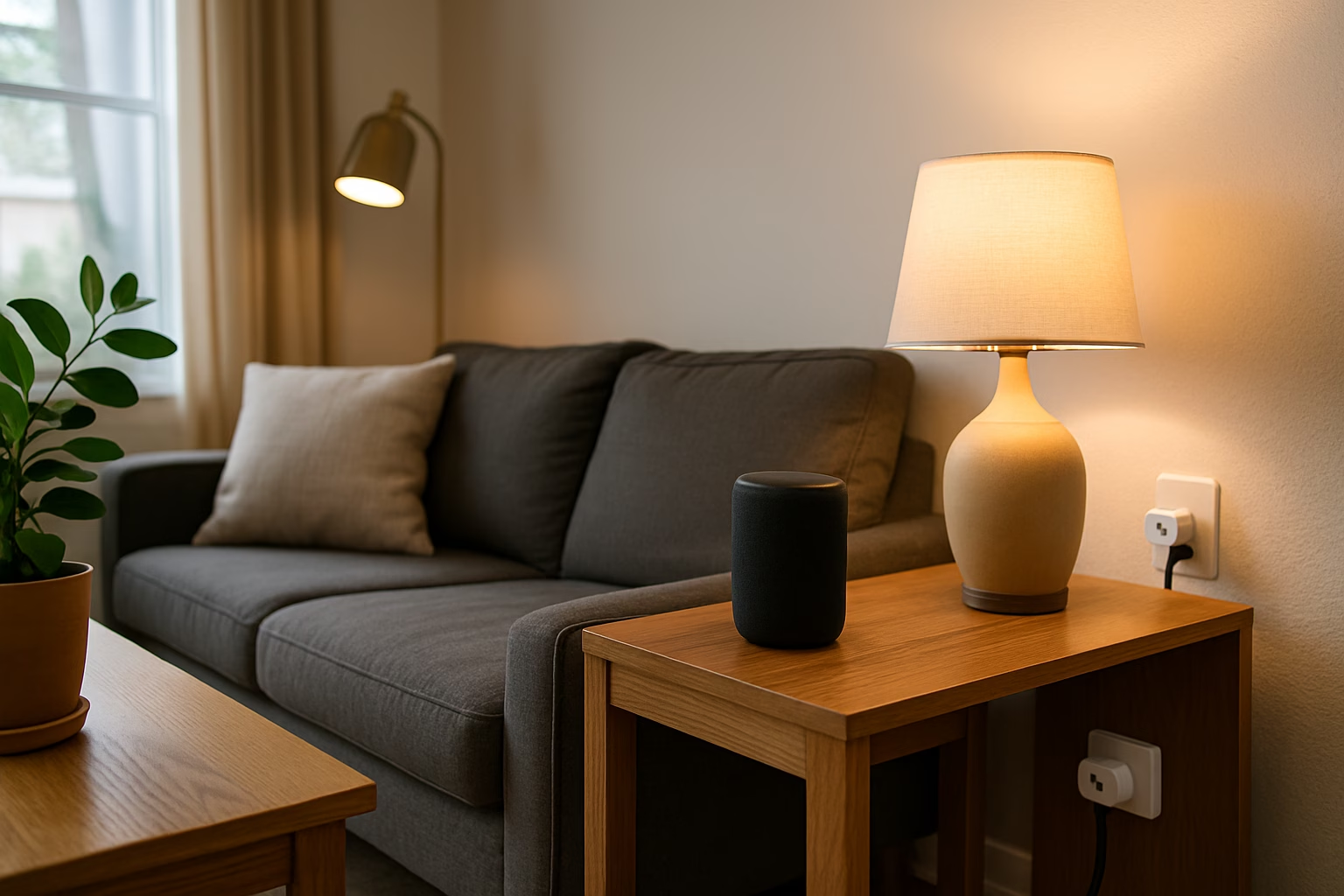
Looking for the best smart home devices for beginners in 2025? You’re in the right place. Starting your smart home journey doesn’t have to be complicated, expensive, or intimidating.
Thanks to today’s easy-to-use tech, you don’t need technical skills, professional installation, or a big budget to enjoy voice control, home automation, and greater everyday convenience.
In this guide, we’ll highlight the best smart home devices for beginners — affordable, reliable, and simple enough for first-time users to install and enjoy right away.
Affiliate Disclosure
This post contains affiliate links. If you click a link and make a purchase, we may earn a small commission at no extra cost to you. As an Amazon Associate, we earn from qualifying purchases.
Quick Comparison Table
| Device | Best For | Requires Hub? | Voice Assistant Support | Price & Link |
|---|---|---|---|---|
| Kasa Smart Plug Mini (2-Pack) | Automating small appliances | No | Alexa, Google, HomeKit | Check Price |
| Sengled Smart Bulb (Wi-Fi) | Voice-controlled lighting | No | Alexa, Google | Check Price |
| Echo Dot (5th Gen) | Voice control + routines | No | Alexa | Check Price |
| August Wi-Fi Smart Lock | Keyless entry | No | Alexa, Google, HomeKit | Check Price |
| Blink Mini 2 Indoor Camera | Room monitoring | No | Alexa | Check Price |
| Amazon Smart Thermostat | Temperature control (easy install) | No | Alexa | Check Price |
What to Look for in Beginner Smart Devices
Choosing your first smart home devices can feel overwhelming, but it doesn’t have to be.
Here’s what to prioritize when getting started:
1. Simplicity
Look for devices designed to work right out of the box, with clear setup instructions and user-friendly apps.
2. Reliable Wi-Fi Connectivity
Strong, stable connections are key. Choose devices that work over Wi-Fi without needing a separate hub.
3. Voice Assistant Support
Most beginners benefit from picking devices that work with Alexa or Google Assistant, or both. Bonus points if they also support Apple HomeKit.
4. Privacy and Security
Opt for trusted brands that offer encryption, strong account protections, and regular software updates.
5. Easy, Non-Permanent Installation
Focus on plug-in, adhesive, or battery-powered devices that won’t require drilling holes or rewiring your home.
Best Smart Home Devices for Beginners
Here are our top picks to kick off your smart home journey with confidence:
Smart Plugs
Kasa Smart Plug Mini (2-Pack)
Best For: Simple appliance control and scheduling
Why It’s Great for Beginners:
- Plugs directly into any standard outlet
- Compact design won’t block other plugs
- No hub needed; connects via Wi-Fi
- Works with Alexa, Google Assistant, and Apple HomeKit
- Lets you turn devices on/off with your voice or phone app
Pro Tip: These plugs also support energy monitoring, helping you track electricity use over time.

- 【Apple Homekit Support】This Apple HomeKit compatible smart plug fully integrates into your Apple ecosystem, just ask Siri to turn on/off the devices in your home. (Apple HomeKit remote control requires an additional networked Apple device at home such as an iPad, HomePod or Apple TV.)
- 【Energy Monitoring & 15A Max Load】Use the smart Wi-Fi home plug to monitor your connected device’s energy usage in real-time and view its historical power consumption within the Kasa Smart app. 1800W, 15A max load supported.
- 【Super Easy Setup】Enjoy an extremely easy and quick setup process with this Amazon Frustration-Free Setup (FFS) & Google Seamless Setup (GSS) supported smart plug. You can also setup in a few steps with the Kasa App.
- 【Compact & Flame Retardant Design】Avoid blocking additional outlets with its compact design, and plug in your WiFi smart plug with confidence thanks to its UL certified flame retardant design and 2-year limited warranty.
- 【App & Voice Control】Control your WiFi smart plug from anywhere, anytime via the free Kasa App or just give voice commands to Siri, Amazon Alexa, Google Assistant or Samsung SmartThings. Your favorite smart assistant enables you to have a truly hands-free experience.

Smart Bulbs
Sengled Smart Bulb (Wi-Fi, Multicolor)
Best For: Easy lighting control and fun customization
Why It’s Great for Beginners:
- Screws into any standard lamp or fixture
- No hub required; connects directly to Wi-Fi
- Supports dimming and full-color options
- Voice controllable with Alexa and Google Assistant
- Great for creating cozy, customized lighting moods
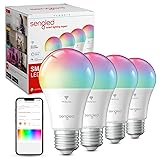
- Voice Control: Color changing WiFi Classic smart bulbs that work with Google Home. Control your smart light bulb via voice commands to turn your smart bulbs on/off, create colorful mood scenes, adjust brightness and more, e.g. Switch on the light bulbs before getting out of bed, dim the smart lights from the couch to watch a movie..Special Features:Color Changing, Color Temperature – 2000 – 6500K
- Schedule Feature: Designed with 16 million colors and tunable white (Amber to Cool White, from 2000K to 6500K) with HIGH CRI>90. Easily setup via using Sengled Home App (iOS and Android), turn smart light bulb on/off, dim smart bulb to the desired level and set up schedules from anywhere. Program timers and routines to automate your entire smart home lighting setup. Control your smart light bulbs while away from home.
- Remote Control: Enhance your smart home with smart WiFi bulb color changing lights, controlled remotely wherever you are. Set timers and light schedules, automating your smart lights to make it seem like someone is home, even when you are away. You can also create a group for all of your light bulbs, and easily group control your smart light bulbs with devices or Google Assistant players. Wireless protocol – 2.4GHz Wireless Technology
- Wake Up & Sleep Mode: Easily setup via using Sengled Home App (iOS and Android). Schedule your smart lights to slowly light up. Starting at the set time, the smart bulbs will slowly brighten throughout the timespan you set. Your lights will slowly get brighter in the morning. And you can also schedule your lights to simulate a sunset so that you can fall asleep more naturally every evening. Your bulbs will slowly dim over the timespan you set.
- No Hub Required: Connect to your home’s secure 2.4GHz WiFi network directly (not support 5GHz); No need for a smart hub or extra equipment. All you need is your smartphone, the Sengled Home App and a 2.4GHz WiFi router to start controlling your smart lights from anywhere. Live customer service based in the U.S.
Smart Speaker
Echo Dot (5th Gen)
Best For: Voice control, music, and automations
Why It’s Great for Beginners:
- Compact, affordable, and portable
- Acts as the command center for your smart home
- Lets you control lights, plugs, thermostats, and more by voice
- Doubles as a music speaker, alarm clock, or timer
- Sets routines like “Good Morning” or “Good Night” actions

- Your favorite music and content – Play music, audiobooks, and podcasts from Amazon Music, Apple Music, Spotify and others or via Bluetooth throughout your home.
- Alexa is happy to help – Ask Alexa for weather updates and to set hands-free timers, get answers to your questions and even hear jokes. Need a few extra minutes in the morning? Just tap your Echo Dot to snooze your alarm.
- Keep your home comfortable – Control compatible smart home devices with your voice and routines triggered by built-in motion or indoor temperature sensors. Create routines to automatically turn on lights when you walk into a room, or start a fan if the inside temperature goes above your comfort zone.
- Do more with device pairing – Fill your home with music using compatible Echo devices in different rooms, or create a home theatre system with Fire TV.
- Say goodbye to drop-offs and buffering – With eero Built-in, Echo Dot doubles as a mesh wifi extender, adding up to 1,000 sq. ft. of wifi coverage to your existing eero network.
Smart Lock
August Wi-Fi Smart Lock
Best For: Keyless home access and secure remote control
Why It’s Great for Beginners:
- Retrofits easily onto most existing deadbolts
- No wiring or permanent changes needed
- Control your door from anywhere via an app
- Works with Alexa, Google Assistant, and HomeKit
- Great for granting temporary access to friends or deliveries
Pro Tip: Unlike many smart locks, the August doesn’t require replacing your entire lock, making it perfect for renters or anyone wanting easy installation.

- Connect your August smart lock to Alexa to Lock, unlock and check lock status. Alexa can also provide notifications when your battery is running low so you can proactively replace them. Set up smart reorders through dash replenishment to make sure you always have replacement batteries when you need them..Note: Measure your door’s backset, cross bore and thickness to ensure you find the right fit.Note: Measure your door’s backset, cross bore and thickness to ensure you find the right fit.
- Keep your existing lock and keys; Simply attaches to your existing deadbolt on the inside of your door; Install in under 10 minutes with just a screwdriver
- Grant family, friends or the dog walker unlimited access or limit it for a few weeks, hours, or minutes
- Only August has Door Sense, a sensor that tells you if your door is securely closed or left open
- Unlocks automatically as you arrive; Never fumble for keys, shopping bags or kids when unlocking the door again; Auto Lock can be timed to lock as the door closes; Requires 110 to 240 volts
Smart Indoor Camera
Blink Mini 2 Indoor Camera
Best For: Keeping an eye on pets, packages, or rooms
Why It’s Great for Beginners:
- Simple plug-in design, no wiring needed
- Clear HD video and two-way audio
- Works with Alexa for voice-based viewing
- Compact and easy to move between rooms
Pro Tip: The Blink Mini supports both cloud and local storage options, giving you flexibility without a forced subscription.

- Mini 2 is our second generation plug-in smart security camera that helps you stay connected to what’s happening in your home, right from your smartphone.
- See and speak from the Blink app — Experience 1080p HD live view, night view in color with a built-in spotlight, a wider field of view, and crisp two-way audio. Stream live video continuously for up to 90 minutes with a Blink Subscription Plan (sold separately).
- Outdoor use — Plug in Mini 2 outside your home with the Blink Weather Resistant Power Adapter (sold separately or as part of a bundle) and mount with the included kit.
- Motion detection — Get real-time motion alerts on your smartphone so you can react and engage from anywhere.
- Smart notifications — Get intelligent alerts including person detection with embedded computer vision (CV) as part of an optional Blink Subscription Plan (sold separately).
Optional: Smart Thermostat
Amazon Smart Thermostat
Best For: Simple, budget-friendly home temperature control
Why It’s Great for Beginners:
- Affordable compared to other smart thermostats
- Guided installation with most systems (may require C-wire)
- Works with Alexa for voice control and scheduling
- Helps lower your energy bill through smarter heating/cooling

- An Alexa thermostat – Amazon Smart Thermostat is an easy way to switch from a traditional thermostats for homes and help reduce energy usage.
- Create comfort zones throughout your home by connecting to select Alexa devices to automatically adjust heating and cooling based on temperature readings or presence detection.
- Save money and energy – After purchase, Amazon will send you an email with details about home thermostat rebates that may be available from energy providers in your area.
- Save energy – According to EPA estimates, ENERGY STAR certified thermostats save an average of $90 on yearly energy bills.
- Programmable thermostat and automatic control – Create your own home, away and sleep schedules, or have Alexa automatically control the temperature with Alexa+ advanced features.
Frequently Asked Questions
Not anymore! Many of today’s best smart devices connect directly to Wi-Fi and work with Alexa, Google Assistant, or HomeKit without a separate hub.
A smart plug or smart speaker is usually the simplest way to start. They require very little setup and instantly add convenience.
Absolutely. Most beginner smart devices are plug-in, adhesive, or battery-operated — no drilling or wiring required. (Bonus: You can easily take them with you when you move.)
If you’re setting up a smart home in a rental or apartment, don’t miss our Best Smart Home Devices for Renters guide for easy, landlord-friendly options.
Yes, but you may need to reconnect devices to the new Wi-Fi network. Some apps even offer step-by-step guides for this process.
Good brands take security seriously. Look for devices that offer two-factor authentication, encrypted connections, and regular updates.
Conclusion: A Smart Home, the Easy Way
Starting your smart home journey doesn’t have to be complicated or expensive.
With the right beginner-friendly devices, you can enjoy more convenience, comfort, and control — all without the headaches of complex installations.
Whether you want to control lights with your voice, secure your front door remotely, or simply make daily life a little easier, the best smart home devices for beginners make it possible.
Need help picking the right gear or setting it up? Contact our team — we’re happy to help you build a smarter, simpler home you’ll love.